
An Open Field Guide to Inference Engineering
This document applies to the Modelplane main branch and not to the latest release v0.5.
This guide is for platform engineers new to inference. If you need to understand how models and GPUs work together and how to run inference in production, this guide will help. You’ll also learn about the tools to use and how to grow into an inference engineering role.
This guide builds on the work of others in the inference community. If you’re interested in inference engineering, continue your learning with these:
- Viktor Farcic’s LLM Inference Explained
- Philip Kiely’s Inference Engineering
- The Pragmatic Engineer, What Is Inference Engineering?
- ByteByteGo’s Guide to AI Inference Engineering
- Data Gravity on The Rise of Inference Engineering
- Spheron’s Inference Engineering Guide
- Vishakha Sadhwani’s The AI Inference Engineering Roadmap
- Upbound, Project Champagne series
1. Why now?
In an AI-forward organization, platform teams become inference teams. Coding assistants can’t send source code to third parties, and frontier model bills increase month to month. Support tools also need internal data that a hosted model can’t reach.
Organizations want to run these models themselves, and open models now make that practical.
Hugging Face hosts more than two million open models, and the best of them compete with closed models. DeepSeek released R1 in January 2025, and it matched OpenAI’s o1 on math and coding benchmarks about a month after o1 came out . When you run your own model, you control latency, uptime, and where your data goes. At high volume, you can also cut costs by about 80% .
The work suits platform engineers. The price of a fixed level of AI capability falls roughly 10x a year, and most of that comes from how models are served, not from better GPUs . Upbound, the company behind Crossplane and Modelplane, saw this firsthand. In its Project Champagne blog series, the team ran its own models on Modelplane and found that vLLM and scheduling worked. The time went to TLS, identity, timeouts, storage, IAM and observability.
Skills that carry over
An inference engineer picks a model, gets it onto the right GPU, keeps it serving, makes it faster and cheaper, and gets paged when it breaks. That’s SRE for a new workload, and most of your skills carry over:
| What you already know | What it becomes in inference |
|---|---|
| Scheduling and node pools | GPU placement with device selectors, taints and exclusive devices |
| Capacity planning | GPU memory math: weights, KV cache and runtime overhead, checked at runtime |
| Load balancing | Cache-aware routing and long-lived streaming connections |
| Autoscaling on CPU | Scaling on queue depth and KV cache use, with cold starts measured in minutes |
| Rollouts | Rollouts of exclusive GPUs, and a version matrix of model, hardware and engine build |
| SLOs and latency percentiles | Time to first token, time per output token and goodput |
| Observability | Engine metrics, real GPU activity and speculative decoding acceptance |
| FinOps | Cost per million tokens and cost per user session |
| Identity and access | Credentials that last as long as an agent session |
A hosted API is still the right call early in a product’s life . Self-hosting pays off when API spend becomes a real line item, when latency or reliability needs outgrow vendors, or when data can’t leave your network. In August 2026, Chris Zeoli counted about 58 open inference roles on public careers boards, with no settled job title.
2. Inference 101
This section covers the concepts in roughly the order you’ll meet them. Most are about what the engine keeps in GPU memory or what limits its speed.
Viktor Farcic suggests asking when each concept starts to matter. Some matter as soon as you deploy, others only once many people use the model, and some you may never need. The table near the end of this section gives the signal for each.
What an inference engine is
An inference engine, like vLLM or SGLang , is the server that turns model weights into an API. For a platform engineer, the closest mental model is a stateful database server with a GPU attached. It loads a large dataset into memory at startup and keeps per-session state. It also schedules work internally and answers over HTTP. Ollama on a laptop is the same idea at small scale, and every hosted model API runs one behind the scenes.
| You know this from databases and services | The engine’s counterpart |
|---|---|
| Loading a dataset into the buffer pool at startup | Loading model weights into GPU memory, which can take many minutes |
| Per-session state in a session store | The KV cache, one for each conversation in flight |
| A query planner and connection pool | The scheduler, which batches requests into each GPU pass |
| A wire protocol clients already speak | An OpenAI- or Anthropic-compatible HTTP API |
| Warming caches after a restart | Cold starts: pulling a large image and reloading the weights |
Unlike a database, the engine keeps its working set in GPU memory, not RAM. GPU memory is small and expensive, so most tuning is about deciding how much of it each request gets.
The inference stack
The engine is one layer of four. At the bottom, kernels do the arithmetic. You rarely choose them directly. Above them sits the engine. Above that, a control plane deploys and manages engines, because sooner or later you run more than one. On top, a gateway routes traffic across models and replicas.
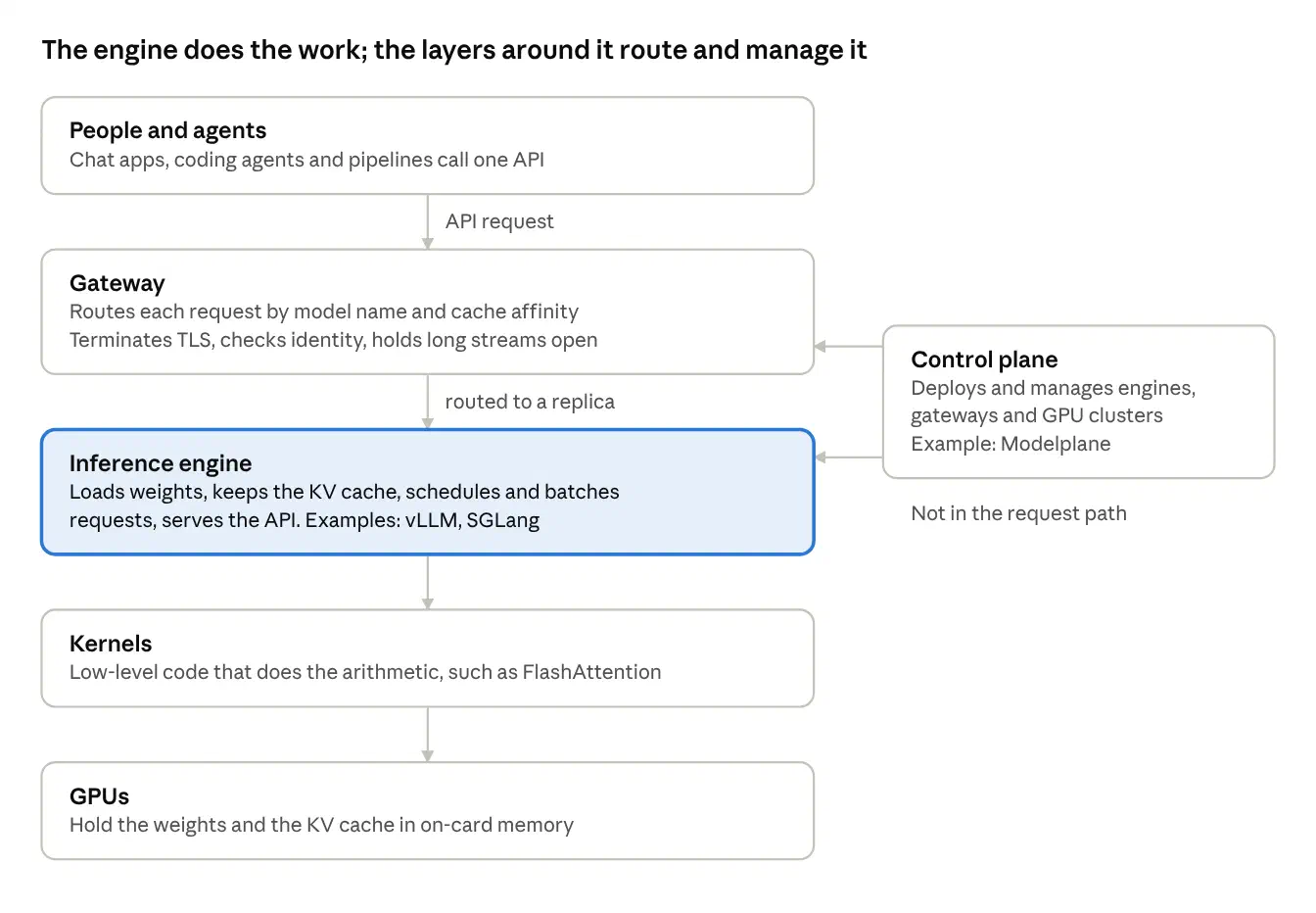
Inference stack: four layers and the clients they serve
Requests pass through the gateway to an engine, which runs kernels on the GPU. The control plane deploys and manages the gateway and engines, but no request passes through it.
Tokens
A token is the unit a language model works in, roughly a word or word fragment. Context windows, prices and speeds are all counted in tokens. When someone quotes tokens per second, they mean this unit.
Weights and the KV cache
The weights are fixed, and the KV cache grows with load. Size for both, as you would a database’s footprint and working set.
Weights are the fixed footprint. Most models are released at 2 bytes per parameter (BF16 or FP16), so an 8B model needs about 16 GB, and it has to live in GPU memory, not system RAM. On a 48 GB L40S, that leaves about two-thirds of the card for everything else. That number is the same for one user or a hundred.
The KV cache is the working set. Each new token is computed against every token before it. Rather than recompute that history, the engine keeps the attention keys and values for every token in flight. Its size scales with context length multiplied by the number of concurrent conversations, much like a session store that grows with both session size and user count.
You can estimate the KV cache per token from a model’s config:
KV bytes per token = 2 × layers × KV heads × head dimension × bytes per valueFor Llama 3 70B at FP16 (80 layers, 8 KV heads, head dimension 128), that is about 320 KB per token. One 128K-token conversation needs about 40 GB of cache. At that size, the KV cache usually limits how many users a GPU can serve.
Watch for these sizing mistakes:
Mixture-of-experts (MoE) models keep every weight resident. A model with 320B total parameters and 18B active still needs about 320 GB at FP8. Only compute scales with the active parameters.
Read the checkpoint size, not the dtype table. While self-hosting its own models for Project Champagne , Upbound estimated one MoE model at about 315 GB from its dtypes (Part 2). The real checkpoint was 177.7 GB, because the experts were stored in a 4-bit format.
Leave room for runtime overhead. CUDA graphs, activations and memory fragmentation all take space. A model that fits at startup can still run out of memory days later (Project Champagne, Part 2 ).
Two phases, two bottlenecks
Each request runs in two phases on the same GPU, and they are limited by different things .
| Phase | What it does | Limited by | Metric it sets |
|---|---|---|---|
| Prefill | Reads the whole input in parallel, including the system prompt and tool definitions as well as the conversation history. Produces the first token and the KV cache. | Compute | Time to first token (TTFT) |
| Decode | Writes the answer one token at a time. Each token needs a pass that reads all active weights, plus the KV cache, from memory. At long context, reading the cache can cost more than reading the weights. | Memory bandwidth | Time per output token and tokens per second |
Generating one token does one or two floating-point operations per byte read from memory, depending on weight precision. An H100 needs about 295 operations per byte to stay busy. That means one request uses a small fraction of the chip while the compute units wait on memory (Data Gravity ).
Peak compute has grown about 3x every two years, against about 1.6x for memory bandwidth. Nearly every optimization either moves fewer bytes per token or spreads each byte across more tokens.
Because the phases have opposite bottlenecks, a technique that speeds one often does little for the other. That is why benchmarks report TTFT and tokens per second separately.
Metrics to track
| Metric | What it measures | Watch out for |
|---|---|---|
| Time to first token (TTFT) | Queueing plus prefill: how long the user waits before anything appears | With reasoning models, the engine’s first token may be hidden thinking. Measure the first token the user sees. |
| Time per output token, or inter-token latency | Decode speed per stream | Speculative decoding and memory bandwidth show up here |
| Tokens per second per user | Interactivity, or the model’s typing speed | Falls as batch size rises |
| Throughput | Total tokens per second across all users | Rises as batch size rises |
| Goodput | Throughput that still meets your latency targets | The number to plan capacity with |
| End-to-end latency | Total request time | Depends on how much the model writes. A healthy 190-second answer is normal for long generations. |
| Percentiles | p50, p90, p99 of each latency | Users feel the tail, not the average |
| Errors and refusals | Failed or rejected requests | Count refusals as errors, or a context cap can look like a speedup |
| Cost per million tokens | GPU cost divided by tokens served | Compare at the load you actually run |
Cost per million tokens converts a GPU price and a throughput into one comparable number:
Cost per million tokens = GPU cost per hour / (tokens per second × 3600) × 1,000,000Spheron’s worked example: a GPU at $2.90 an hour sustaining 1,200 tokens per second costs about $0.67 per million tokens.
Latency versus throughput
Batching more requests together raises total throughput and slows each individual user. Interactive chat and coding favor latency. Overnight batch jobs favor throughput.
It’s the same trade-off as tuning a database for transactions or for analytics. Write down the workload’s constraints before you tune anything.
When to adopt each concept
Each row gives the symptom that tells you it’s time to act, in roughly the order teams need them.
| Concept | What it does | The signal that you need it |
|---|---|---|
| Fitting the weights | Choose a model, precision and GPU so the weights fit with room to spare | The engine fails to start, or starts with almost no KV cache left |
| Continuous batching and paged KV cache | Share each GPU pass across requests, and hand out cache in small blocks | Already on by default in vLLM and SGLang. Check it, don’t build it. |
| Quantization | Store weights in fewer bits, and give the freed memory to the KV cache | Requests queue while the GPU still has compute to spare |
| Prefix caching | Reuse the work already done on repeated prompt openings | Already on by default in vLLM and SGLang. Watch the hit rate once your clients are agents or chat apps that resend long histories |
| Speculative decoding | Draft several tokens and verify them in one pass | Individual responses stream too slowly, even at low load |
| Gateway and control plane | Route between replicas, and manage engines declaratively | You add a second model, a second replica or a second cluster |
| Sharding across GPUs | Split one model with tensor, pipeline or expert parallelism | The model will not fit on one GPU. Plan this before you deploy. |
| Autoscaling | Add and remove replicas on queue depth and KV cache use | Idle GPUs show up on the bill, or queues build at peak hours |
| Disaggregation | Run prefill and decode on separate GPUs | Long prompts stall streaming at scale, and you have RDMA-class networking |
Most teams need only the first few rows on day one. Add the rest when their signals show up.
What agents change
Coding agents and other agentic workloads stress every part of this picture. Upbound measured this in Part 5 of its Project Champagne series (introduced in Section 1), where about 10 of its engineers ran Claude Code and other coding agents against a self-hosted model. Their traffic looked like this:
Prompts are long. The median prompt was 59K tokens and the p90 was 125K.
Prompts are mostly repeated. About two-thirds of prompt tokens hit the prefix cache, because agents resend their transcript on every turn.
Thinking is hidden. A reasoning model can think for more than a minute before its first visible token. Every timeout between the agent and the model has to allow for that.
Load depends on the client. Short-prompt sessions launch subagents and can keep more requests in flight than long-prompt sessions. Plan capacity in requests in flight rather than seats.
Sessions run for hours. Streams, tool calls and credentials all have to keep working for that long.
3. Running inference in production
In production, every choice trades latency, throughput, cost and quality against each other, usually with too few GPUs. Where a practice comes from Project Champagne, Section 5 has the details.
3.1 Start from use cases, not hardware
Each use case sets different requirements. In Project Champagne:
Coding agents needed long context without quality loss, reliable tool-call parsing, streaming, sessions that last hours, and an Anthropic-compatible API for Claude Code.
Chat needed low time to first token, real concurrency, and an OpenAI-compatible API for existing tools.
The platform needed TLS on a real hostname and identity tied to the company domain. It also needed observability that tells a healthy engine from a busy one, and correct placement without babysitting.
Separate interactive workloads from batch workloads. They need different targets, and often different deployments. Write the pass and fail bar down before you test anything.
3.2 Pick models deliberately
Evaluate on your own tasks. Public benchmarks measure someone else’s workload. Section 3.11 covers how.
Start small, then grow. A small MoE model with a few billion active parameters builds operating experience faster and costs less to get wrong.
The newest model is not always the right one. Model releases move faster than hardware plans. A new ‘small’ flagship can need several of the largest cards, while your current model may be running at half its supported context. The cheapest gain may not need a new model at all.
Check that your engine can actually load it. A model listed as supported in release notes may still fail to load on your hardware and engine build.
Check the license. Most open models use permissive licenses, but some restrict commercial use.
Check the chat template and parsers. Tool calls and reasoning output depend on settings each model needs in the engine. A wrong one breaks tool use while every request still returns 200.
3.3 Size for runtime, not startup
A model that fits at startup can still run out of memory under real traffic when fragmentation pushes past the profiled peak. That can happen days later, in the middle of a request.
Budget all three costs: weights, KV cache, and runtime overhead such as CUDA graphs and activations.
Know what your engine’s memory setting covers, and check again on every upgrade. vLLM sizes its KV cache from a startup estimate of everything else, including CUDA graph pools, and real traffic can go past that estimate. If you see out-of-memory errors under load, lower the memory fraction slightly, enable expandable segments and cap concurrent sequences, then measure free memory again.
Cap every request. Set a maximum output length on every call. Without one, any request can take a model down for everyone, and abandoned requests keep generating after the client gives up.
Shorten context with care. A shorter maximum context frees KV cache for more users. It also rejects every longer conversation, so count those rejections as errors.
3.4 Know the optimization techniques
Most engines turn on continuous batching and paged KV cache by default. The rest are choices you make per model and workload.
| Technique | What it improves | Cost or risk | Use it when |
|---|---|---|---|
| Continuous batching | Throughput. Orca reported 36.9x over a static baseline at the same latency. | Per-user speed drops as batches grow | Always. It is the default in modern engines. |
| Paged KV cache (PagedAttention ) | Concurrency. vLLM cut KV cache waste from 60 to 80% to under 4%. | Little in practice | Always. It is the default in vLLM. |
| Prefix caching | TTFT and prefill cost on repeated openings | Only helps up to the first token that differs | System prompts, RAG, multi-turn chat and agents |
| Weight quantization | Decode always, and prefill only when activations are quantized too, as with FP8. Weight-only formats such as AWQ and GPTQ speed up decode alone. One step down in precision is typically 30 to 50% faster (Inference Engineering). | Quality loss, which you must measure | Use the lowest precision your hardware runs natively and your evals accept. FP8 runs natively on Ada, Hopper and Blackwell GPUs. |
| KV cache quantization | More cache fits, and it moves faster | Errors compound from token to token | When KV cache is the limit |
| Speculative decoding , multi-token prediction | Tokens per second at low batch sizes | Wasted compute when guesses are rejected. Its value shrinks as load rises and spare compute runs out. | Latency matters and output is predictable |
| Tensor parallelism | Fits large models, faster per user | Needs fast GPU-to-GPU links such as NVLink | Large models within one node |
| Expert parallelism | Throughput for MoE models | Routing between experts | MoE models, including across nodes |
| Pipeline parallelism | Fits a model across nodes on ordinary networking | Adds latency to each pass | The model does not fit in one node |
| Prefill and decode disaggregation | Removes interference between phases. DistServe reported 7.4x more requests within latency limits. | Needs RDMA-class networking to move the KV cache | Large scale, long prompts, fast interconnect |
A few rules of thumb:
Structure prompts for the cache. Prefix caching stops at the first token that differs. Put shared content such as system prompts and tool definitions first, and variable user input last. Hosted APIs price cached input at 10 to 50% of fresh input, as of 2026, for the same reason ).
Quantize from least to most sensitive. Linear weights tolerate quantization best, then activations, then the KV cache. Attention layers are the most sensitive, because small errors compound across a long sequence. Keep the most sensitive parts at higher precision until your evals show you can go lower. Floating-point formats such as FP8 handle outlier values better than integer formats.
Watch speculative decoding acceptance. Acceptance depends on temperature, subject matter and the draft model. If acceptance collapses, every pass still pays for the guesses and the model slows while other panels look normal.
Beware interactions when applying multiple techniques. Quantizing the KV cache helps disaggregation. Larger batches leave less spare compute for speculation. One Baseten engineer tried 77 configurations before finding one that doubled throughput for a customer (Inference Engineering). Change one thing at a time and measure (Section 3.10).
Keep long prompts from stalling other streams. Chunked prefill splits a long prompt across several passes, so decode keeps moving for everyone else. Current vLLM turns it on by default, and its token budget per pass is the setting to tune before you consider disaggregation.
3.5 Get GPUs, and place them correctly
Quota doesn’t guarantee capacity. Quota only lets you request instances. Each instance size is its own capacity pool, even with the same GPU, and no cloud API tells you what you can actually launch.
Design for whatever GPUs you can get. Expect to get the GPU you planned for only some of the time. A model may end up split across smaller nodes in different zones, using pipeline parallelism over ordinary networking. Allow multi-zone pools, and keep the model definition independent of the instance type and node count.
Match models to hardware explicitly. Kubernetes Dynamic Resource Allocation (DRA) device selectors can pin a model to a GPU architecture or a minimum memory size. Verify placement against what the GPU driver publishes, not against a status field that echoes what you declared.
Watch the cloud, not just the controller. A managed node group can report failure while the cloud keeps trying to launch instances, and GPUs that arrive hours later can be shut down by a later change to the pool. Track instances and node joins, and list a pool’s instances before you change it.
Know your interconnect. SXM datacenter GPUs such as H100, H200 and B200 link GPUs with NVLink. PCIe cards such as the L40S and RTX PRO 6000 do not, so multi-GPU communication goes over PCIe and host memory. That changes which parallelism strategies pay off.
Size the system pool too. GPU nodes are tainted for inference. Monitoring, controllers and gateways compete for whatever general capacity is left.
3.6 Gateways, routing and timeouts
Do not round-robin. One replica may already have a conversation’s prefix in cache while another has never seen it. Use cache-aware or prefix-aware routing, such as the endpoint picker in the Gateway API Inference Extension .
Route by model name. One hostname can serve many models, routed on the request’s model field.
Speak both common APIs. Most tools expect the OpenAI API. Claude Code expects the Anthropic Messages API, which vLLM serves natively, including streaming and tool calls.
Raise every timeout on the path. Long generations and reasoning models break the defaults, because each hop has a default timeout sized for web requests, not for generations that run for minutes. Typical culprits are a gateway route timeout that bounds the whole response, a load balancer idle timeout, and retries that multiply the wait. Check the route, each load balancer, the gateway, the client and any helper calls the client makes.
Detect truncated streams. A cut stream can return HTTP 200 with valid tokens and then stop. To the client, it looks like a finished answer.
Meter usage per caller. Token-based rate limits and quotas at the gateway keep one heavy user or runaway agent from starving everyone else.
3.7 Security and identity
Never expose an open endpoint. Apply your auth policy before the gateway gets an address, and remove it last when you tear down.
Use real TLS on a real hostname, with a plan for certificate issuance and renewal.
Plan for three kinds of client. People are the simplest case. Browsers cannot attach a bearer token to page loads or preflight requests, so handle browser login with OIDC at the gateway. Agents run for hours and read their credential once, so a 60-minute identity token will end them mid-session. Give agents long-lived API keys or a credential that refreshes.
Do not stack two expiring sessions. An outer gateway login in front of an app with its own login causes an outage when the outer session expires.
Test what should be refused. Build a probe matrix of requests the gateway must reject, such as a missing, garbage, unsigned, expired or revoked key, or a forged caller header. Include paths that must remain reachable, such as the health check. Run it on a schedule and in a loop during changes.
Carry identity into usage records, so you can see who sends what. Overwrite any caller header a client tries to forge.
Treat model weights like code. Prefer safetensors over pickle-based checkpoints, don’t enable remote code from a model repo you haven’t read, and pin each model to a specific revision.
3.8 Observability
Scrape the engines. Engines expose detailed Prometheus metrics. Nothing collects them unless something is set up to scrape them, such as a ServiceMonitor and a named port.
Build the core panels: requests running against the concurrency limit, requests waiting, KV cache use, TTFT, time per output token, output tokens per request, prefix cache hit rate, speculative decoding acceptance, errors by status code, and cancellations.
Measure quality on the server. Broken tool calls, cut-off answers and empty responses usually reach you as user complaints while the serving dashboards look normal. Count them on the server instead, including tool calls that fail to parse, responses cut off by the length limit, empty outputs, refusals and hidden reasoning tokens per request. The gateway sees every response, so it can count anything the engine doesn’t export.
Look past
GPU-Util. It reports whether anything ran, not how much of the chip worked. A GPU can report near 100%GPU-Utilwhile SM activity is around half and tensor cores sit mostly idle. Graph SM activity and tensor activity as well.Tell the kinds of slow apart. When requests are queued, running is at the limit, waiting is above zero and the KV cache is full. When the model is thinking, TTFT looks fine but each request writes many hidden tokens. When generation is slow, time per output token is up.
Watch the watcher. Something outside the monitoring stack must check that data is fresh and that new metrics arrive from every cluster. A metrics adapter can report its API as available while returning empty results.
Keep logs you can debug from. Metric scrapes can make up nearly all of a retained engine log. Keep per-request access logs with the caller, send them to a log store, and remember
kubectl logs --previousafter a crash.Normalize metric names across engines, so a vLLM deployment and an SGLang deployment are judged on the same signals.
Set SLOs on what users feel, measured per request at the front door:
Responsive: time to the first token the user actually sees, under a threshold.
Fast enough: time per output token, under a threshold.
Answered: the request completed without an error, and any tool call in it parsed.
Do not set an SLO on total request time, because it depends on how much the model writes. Low-traffic models need a fleet-wide SLO, longer windows or synthetic traffic. Missing data reads as 100% good, so keep a separate alert for metrics that stop arriving. Open source tools such as Sloth and Pyrra turn SLO definitions into burn-rate alerts. For background, see Observability Engineering .
3.9 Autoscaling and cold starts
Scale on inference signals, such as queue depth, KV cache use and requests in flight. CPU usage tells you almost nothing here.
Combine traffic and load. Traffic lets you scale ahead of demand, and load lags behind it. The settings are the ones you already tune on any autoscaler. Set minimum and maximum replicas and the length of the metrics window. Then set the scale-down delay and how many concurrent requests one replica should hold. Kiely’s book covers each in depth for inference.
Plan for slow cold starts. A new GPU node must boot, pull a large engine image and load the weights. Loading weights alone can take half an hour for a large model. Cache weights on shared storage in each cluster so new replicas do not download them again.
Be careful with scale-to-zero. By the time a node is ready, the spike may be over, and scarce GPU capacity may not come back.
Plan for multiple clusters at scale. Past a few hundred GPUs, capacity pushes workloads across regions and providers. A control plane that treats separate pools as one avoids leaving capacity idle in one pool while another runs short.
3.10 Change management
Track a three-way version matrix: model, hardware and engine build. New models often need a nightly or model-specific engine build on day zero.
Plan rollouts for exclusive GPUs. A GPU claim is exclusive, so a rolling update on a one-replica deployment deadlocks: the new pod cannot schedule and the old one never leaves. Use a Recreate strategy or allow one unavailable, and budget the downtime.
Ready doesn’t mean routable. A gateway can lag a ready replica by a minute or two.
Test serving changes like code. Make each change a pull request and change one thing at a time. Write the bar down first. Sweep load upward until a step misses the bar, and report capacity as one number with a confidence interval.
Test the test rig first. A rig bug can waste a scarce GPU window that a few minutes on a laptop would have caught.
Test on your own hardware with traffic like yours. Agent prompts are long and mostly cached. A benchmark of short, fresh prompts measures a different system.
Promote every serving change through tiers. Each tier costs more than the one before and catches a different kind of failure, so most problems show up before users see them:
Offline. Validate the config and run the test rig’s own checks. This takes minutes on a laptop and no GPU.
Rehearsal. Run the full test end to end against a fake gateway or a small model, so rig bugs don’t cost a GPU window.
Smoke. Send a few real requests on the target hardware. Include a long prompt, a tool call and a streamed answer, plus one request that should be refused.
Load with evals. Sweep concurrency up to your bar with the eval suite running alongside, and compare against the current version on the same traffic. Evals can pass one request at a time while tool calls break under concurrent load, with nothing moving on the serving dashboards.
Canary. Send a small share of real traffic to the new version and compare its server-side signals with the current one: TTFT, time per output token, errors, tool-call parse failures and length-limit stops. A gateway that routes by model name can split traffic by weight. Write the rollback trigger down before you start.
Full rollout. Keep the old version ready to take traffic back until the new one’s signals stay within the bar through a peak in traffic.
3.11 Quality and evals
When an open model scores low, check three places before you blame the model:
The harness. Is the model the only thing that changed? Run your current hosted model first. If it scores below a weaker model, the harness is broken.
The infrastructure. Did the model get a chance to answer? Timeouts, expired credentials and routing errors show up as model failures. Mark those runs “not measured.”
The grader. Does the check measure the outcome you care about? Grade the end state, not the agent’s description of it, and test your graders against answers people already accepted or rejected.
Also pin the data the right answer depends on and give every model the same context. Keep test markers where the model cannot read them. Run each test more than once, and prefer deterministic checks over using a model as the judge. A batching server can return different tokens for the same request even at temperature 0, so expect some variance unless the engine runs in a slower batch-invariant mode.
3.12 Incidents and debugging
Expect silent failures. The costly problems often don’t throw errors: a truncated stream returns 200, a metrics API reports available, node groups report ready. Part of the platform’s job is to make those failures loud.
Look at the duration. A failure at a round number of seconds is a timeout. A multiple of it, such as 239 seconds after four 60-second tries, points to retries.
Bypass a layer. Take one hop out of the path and see whether the problem moves.
Verify status against reality. A status is one component’s view of its own job. Check the disk, the instance or the route itself.
Work additively, and upstream the fix. Keep workarounds beside the platform, labelled for teardown, rather than editing objects a controller owns.
Checklist before your first users
Use cases defined, with a written bar for time to first token, speed per user and error rate
Model chosen on your own evals, with your current hosted model as the baseline
Engine build confirmed to load the model on your hardware
Memory budget covers weights, KV cache and runtime overhead, with max output tokens and max concurrent sequences set
GPU placement verified against the driver, with a fallback instance shape or zone
Auth policy applied before the gateway gets an address, and TLS on a real hostname
Credentials that last as long as an agent session
Timeouts raised at every hop: route, load balancers, gateway retries, client and helper calls
Engine metrics scraped, GPU SM and tensor activity graphed, and an alert when metrics stop arriving
Server-side counts of tool-call parse failures, length-limit stops and empty responses, so users aren’t your first alert
A probe matrix of requests that must be refused and paths that must stay open
A rollout strategy for exclusive GPUs, with downtime budgeted
Previous container logs preserved after a crash
Serving changes promoted through tiers, with evals under concurrent load and a canary with a written rollback trigger
Workarounds kept beside the platform, labelled for teardown, with fixes sent upstream
4. The stack
Go deep on the engine. You already know Kubernetes, gateways and observability, so learn what changes for inference. For kernels, reading a profile is enough. Most inference engineering happens higher up the stack.
Tools by layer
| Layer | Tools to know | Master first |
|---|---|---|
| GPUs on Kubernetes | NVIDIA GPU Operator , Dynamic Resource Allocation and its NVIDIA driver , DCGM exporter | How GPUs are advertised, requested and placed |
| Kernels and libraries | CUDA , PyTorch , Triton , FlashAttention , torch.compile | Kernel basics, kernel fusion, and how to read a profile |
| Inference engines | vLLM , SGLang , TensorRT-LLM ; Ollama and llama.cpp for local work | vLLM’s core flags: --gpu-memory-utilization, --max-num-seqs, --max-model-len, tensor parallel size, quantization, prefix caching, chunked prefill |
| Distributed serving | NVIDIA Dynamo , llm-d , KServe , LeaderWorkerSet | Multi-GPU and multi-node layouts, and prefill and decode split |
| Gateway and routing | Envoy Gateway , Agent Router (formerly Envoy AI Gateway), Gateway API Inference Extension | Streaming, timeouts, auth policies, model-name and cache-aware routing |
| Control plane | Modelplane , built on Crossplane | Declaring clusters, hardware classes, deployments and caches across environments |
| Observability | Prometheus , Grafana , OpenTelemetry , Loki , Sloth or Pyrra | Engine metrics, real GPU activity, and SLOs on user-facing latency |
| Benchmarking | vLLM’s benchmark tools , NVIDIA AIPerf , GuideLLM , SemiAnalysis AgentX traces | Concurrency sweeps and latency percentiles under realistic prompts |
| Evals | Inspect from the UK AI Security Institute; Hugging Face upskill for testing skills across models | Deterministic graders on the end state of a task |
| Models | Hugging Face Hub , safetensors checkpoints | Reading a model config for layers, heads and context, and checking real file size |
Choosing an engine
The engine controls batching, memory management, kernel selection and API compatibility. It often matters more to cost and throughput than a hardware upgrade.
| Engine | Why teams pick it | What it costs to operate |
|---|---|---|
| vLLM | The broadest model coverage, plus OpenAI and Anthropic APIs out of the box, so it is the usual first deployment. Hosted by the PyTorch Foundation. | Frequent releases with new flags. Pin versions and re-benchmark on every upgrade. |
| SGLang | A radix-tree prefix cache and a scheduler that favors requests sharing a cached prefix, which suits agents and long multi-turn sessions. Upbound measured its biggest single gain here (Project Champagne, Part 5, 2026). | A smaller community, and new models may need nightly builds before a tagged release works. |
| TensorRT-LLM | Kernels tuned for NVIDIA hardware, including FP4 on Blackwell | NVIDIA hardware only, which ties your serving stack to one vendor. |
| NVIDIA Dynamo | A layer above engines that coordinates many nodes, including split prefill and decode | Another distributed system to run, so use it only at multi-node scale. |
| Ollama , llama.cpp | Local serving for learning and prototyping | Not designed for many concurrent users |
Hugging Face’s TGI was a common choice and is now in maintenance mode, so check release cadence, maintainers and foundation backing before you commit to one. Engines add new flags every few weeks. Re-run your benchmarks when you upgrade, rather than trusting last quarter’s numbers.
Upbound’s own comparison in Project Champagne, Part 5 shows this. The team was serving a coding model to about 10 engineers on two 8-GPU nodes and tested how to grow to a team of 15. On the same hardware and the same agent traffic, switching from vLLM to SGLang was the largest single gain it measured. Adding SGLang’s host-memory cache on top didn’t add a measurable gain, because the KV cache never filled.
Where Modelplane fits
Modelplane is an open source project from Upbound, built on Crossplane and released under the Apache 2.0 license. It orchestrates models, inference engines and AI infrastructure across clouds, neoclouds and your own GPUs, with Kubernetes-style declarative APIs. It provisions inference clusters or uses ones you bring. Documentation is at docs.modelplane.ai .
Modelplane splits the work into three layers of ownership. You can use the same split as a mental model even with different tools.
| Who | Owns | Modelplane resources |
|---|---|---|
| Platform team | The fleet: clusters, hardware classes and the gateway | InferenceCluster, InferenceClass, InferenceGateway |
| Model operator, or inference engineer | The models: deployments, services and weight caches | ModelDeployment, ModelService, ModelCache |
| Modelplane | Everything in between, composed from the two above | ModelEndpoint, ModelReplica |
The hierarchy mirrors core Kubernetes one scope up. ModelDeployment → ModelReplica → ModelService → ModelEndpoint parallels Deployment → Pod → Service → Endpoint, across a fleet instead of within one cluster. You bring the engine container and its flags, and Modelplane shapes the topology around them. People and agents never create any of these. They call the InferenceGateway by model name.
Modelplane maps vLLM and SGLang metrics onto common names out of the box, and a MetricMapping adds any other engine, so different engines are judged on the same signals.
For a platform engineer, the second layer is where the new learning is. Upbound found the same thing when it started self-hosting in Project Champagne, Part 1 : the cluster and gateway work was familiar, and the model operator layer held the unknowns.
A suggested order to learn the stack
Run vLLM on one GPU behind its OpenAI-compatible API, and read its metrics endpoint.
Deploy it on Kubernetes with the NVIDIA GPU Operator, and place it with device selectors.
Put a gateway in front of it with TLS, auth and timeouts sized for long streams.
Scrape engine and GPU metrics into Prometheus and build the core panels from Section 3.8.
Benchmark it with a concurrency sweep, and run a small eval suite alongside it.
Serve the same model on SGLang and compare on your own traffic.
Split a larger model across GPUs with tensor and pipeline parallelism, then try a distributed serving layer.
Learn enough CUDA and profiling to understand why a kernel or a setting made the difference.
5. Learn from teams that share their work
Much of what you need to know about running inference comes from teams that wrote up what broke. Learn to read those write-ups critically, and write your own (Section 6).
How to read a case study
Find the setup. Model, hardware, engine version and traffic shape. Note the date, because numbers age fast.
Find the bar. What counted as good enough, and who decided.
Follow the failures. What broke, how the team found out, and how long it took to detect.
Check the method. Did they change one thing at a time and measure it on their own traffic?
Separate what transfers. A timeout lesson applies everywhere, but a specific flag value only holds for that engine release on that hardware.
Case study: Project Champagne (2026)
Upbound, the company behind Crossplane and Modelplane, self-hosted chat, coding agents and a CVE-fixing build agent on open models with Modelplane, across AWS and Nebius GPUs. The team published what broke in a five-part series. Highlights, with numbers as of 2026:
- Serving was the smaller problem. vLLM and scheduling worked. TLS, identity, timeouts, storage and observability took the time. (Part 2)
- Quota did not mean capacity. Approved quota for 768 vCPUs of H100 instances never produced one, and the planned GPU arrived about half the time. One model ended up split across two nodes in two zones. (Part 2)
- Fitting at startup wasn’t enough. A chat model that fit cleanly ran out of memory nine times in four days. Lowering the memory fraction from 0.92 to 0.88, enabling expandable segments and capping concurrent sequences at 16 freed 4.6 GiB. (Part 2)
- The expensive failures were silent. A truncated stream returned 200, a metrics API reported available with no data, and monitoring sat pending for six days. (Part 2)
- Timeouts stacked up. A 15-second route default, then a 60-second load balancer idle timeout, cut off answers that were still streaming. (Parts 2 and 3)
- Agents were the hardest clients. Hour-long sessions ran past the 60-minute lifetime of their tokens, and a reasoning model thought for more than a minute before its first visible token. (Parts 2 and 3)
- Low scores were often not the model’s fault. A fake shell in the test harness scored Claude 0. A 60-second idle timeout failed a model that completed every run once the limit was raised. (Part 3)
- Slowness had several causes. An engineer’s “wow, is it slow” traced back
to hidden maximum-effort reasoning while every dashboard looked fine. One GPU
showed 99%
GPU-Utilwith tensor cores busy about 10% of the time. (Part 4) - Load depended on the client. Agent prompts had a median of 59K tokens, about two-thirds hit the prefix cache, and short-prompt sessions kept more requests in flight by launching subagents. (Part 5)
- The engine mattered more than expected. On the same two 8-GPU nodes, moving from vLLM to SGLang was the largest single gain. A 128K context cap only looked faster because it rejected long conversations. (Part 5)
Read the full series
Each post on the Upbound blog tells these stories in detail, with the configs, queries and numbers behind them:
Part 1: What it takes to own your intelligence. Why Upbound self-hosts inference, and how the use cases picked the models and hardware.
Part 2: Finding the corks. The inference lifecycle stage by stage, from pick and place to change and fail.
Part 3: The build security agent. How to tell whether an open model can do a real job as well as a hosted one.
Part 4: Candling the bottles. What the team could see at each step, what it missed, and how it plans to alert.
Part 5: From pilot to team. A repeatable way to test serving changes and size capacity for a growing team.
6. Making the career move
You don’t need to start over. Add inference concepts to the platform skills you have, and show the work in public. The field is young, so newcomers can catch up fast.
Pick a direction
Pick the direction closest to the work you already do. Most platform engineers start in the first two and grow toward the third.
| Direction | Focus | Good fit if you |
|---|---|---|
| Inference platform | Clusters, GPU scheduling, gateways, autoscaling, multi-cloud capacity | Enjoy Kubernetes and distributed systems |
| Inference reliability | SLOs, observability, capacity planning, rollouts, incident response | Have carried a pager and run SRE practices |
| Runtime performance | Engine tuning, quantization, speculative decoding, parallelism, kernels | Like profiling and working close to the hardware |
Follow a learning path
Vishakha Sadhwani’s AI Inference Engineering Roadmap 2026 is a thorough 13-stage map of the field. Coming from platform engineering, you can move through it faster, because you already own much of the infrastructure half. A shorter path:
Learn the model, not just the container. Transformer basics, attention and the KV cache, dense versus MoE models, and how to read a model config. The goal is to estimate the memory any model needs in five minutes.
Learn one engine deeply. Pick vLLM, learn what each core flag trades away, and measure time to first token and per-token latency yourself.
Translate your platform skills to GPUs. Device allocation, gateways that hold long streams, autoscaling on inference signals, and observability for engines.
Learn to judge quality and cost. Build an eval, run a capacity sweep and calculate cost per million tokens. This is where platform engineers most often have a gap, and where the role adds the most value.
Build projects that prove it
Each project below fits on a rented GPU or two, and each produces a repo with real numbers. Shut instances down between runs, and use spot capacity for batch experiments.
| Project | What it proves | What to publish |
|---|---|---|
| Serve an 8B model with vLLM on one GPU. Sweep 1, 10 and 50 concurrent users. | You can measure TTFT, time per output token and throughput accurately | Configs, the load script, charts and cost per million tokens |
| Predict how many 32K-token sessions fit on your GPU, then test it | You understand weights, KV cache and runtime overhead | Your prediction, the result and why they differ |
| Compare FP16 and FP8, and a 4-bit format if you can | You can trade quality against speed with evidence | Eval scores next to latency and throughput |
| Run the same prompts with shared content first, then last | You understand prefix caching and prompt structure | Cache hit rate and TTFT for each |
| Deploy on Kubernetes with the GPU Operator, a gateway with TLS and auth, autoscaling on queue depth, and dashboards | You can run inference as a platform | Manifests or compositions, and dashboard definitions |
| Compare vLLM and SGLang on agent-like traffic, one change at a time | You make engine choices with data | The bar, the method and results with intervals |
| Build an eval harness for one agent task with deterministic graders | You can tell a model failure from a harness failure | Tasks, graders and negative controls |
| Reproduce a failure: a timeout, an out-of-memory crash or a stuck rollout | You can operate it, not just deploy it | A short postmortem and runbook |
Show your work in public
Many inference roles fill through networks before they reach a careers board. In August 2026, Zeoli found one serving company valued at $17.5B that didn’t list any dedicated inference performance openings. Public work is how people outside those networks get found.
Write READMEs like lab reports. State the question, the setup (model, GPU, engine version and flags), the method, the results with numbers, what surprised you, and how to reproduce it.
Publish what failed. A clear account of a failure shows more skill than a clean demo.
Pin versions and show cost. Results without an engine version and a price are hard to trust and harder to reuse.
Write and speak about it. Turn each project into a short post. Submit talks to meetups, CNCF events and community live streams.
Contribute to open source
Much of what inference projects still need is platform work. Upbound’s own upstream list from Project Champagne reads like a platform backlog: configurable load balancers, certificate issuance, Recreate rollouts for exclusive devices, an honest Ready signal, engine metrics scraped out of the box, and auth that suits long-running agents.
Projects to follow include vLLM , SGLang , llm-d , KServe , NVIDIA Dynamo , Agent Router (formerly Envoy AI Gateway), the Gateway API Inference Extension , Modelplane and Crossplane . Good first contributions:
Run it and report what breaks, with a reproduction and numbers. This is how Champagne contributed most.
Write operator documentation: deployment, tuning and troubleshooting guides drawn from your own runs.
Add metrics, dashboards and alerts that make silent failures loud.
Improve manifests, Helm charts and compositions for real environments.
Contribute benchmark recipes and tests for the hardware you have.
Read each project’s contributing guide, start with a small change, and comment on an issue before taking on a large one.
Ongoing learning
Engines add flags every few weeks, and research reaches production within months.
Read release notes for the engine you run, every release, and re-run your benchmark when you upgrade.
Read the core papers: Orca on continuous batching, PagedAttention , DistServe on disaggregation, the original speculative decoding paper, and FlashAttention .
Read Philip Kiely’s Inference Engineering . The e-book is free from Baseten.
Follow practitioners. Newsletters such as The Pragmatic Engineer , ByteByteGo and Data Gravity cover the field well. Join the community channels for the engines you use.
Learn evals. Whether an open model can replace a hosted one is decided by evals, and few engineers can build good ones. Start with Anthropic’s Demystifying evals for AI agents and Hamel Husain and Shreya Shankar’s evals FAQ .
Learn the economics. Be able to explain cost per million tokens and cost per user session to a finance partner.
Find the roles
Don’t expect a consistent job title yet. The same work shows up as inference engineer, performance engineer, model serving engineer or ML infrastructure engineer, and sometimes as AI platform engineer, so search for all of them. Pay reflects how scarce the skills are: in August 2026, Zeoli found an Anthropic inference performance role posted at $350,000 to $850,000, and an OpenAI equivalent at $295,000 to $555,000.
You may not need to change jobs to get started, though. If your company is planning to self-host its first model, put your hand up. Your team will probably end up responsible for that project anyway, and running it is the most direct experience you can get.
Prepare for interviews
Practice answering these. Each one points to the section of this guide that covers it. Several are adapted from Lamhot Siagian’s interview pocket notes on efficient inference (Section 7).
Prefill and decode. Why is decode usually limited by memory bandwidth rather than compute, and what changes at long context? (Section 2)
Hardware trends. If compute keeps growing faster than memory bandwidth, will inference soon become compute-bound? (Section 2)
Memory math. How much memory do a model and its KV cache need at a given context length and concurrency? (Section 2)
Goodput. What is goodput, and why plan capacity with it? (Section 2)
Prefix caching. Which applications benefit most from prefix caching? (Section 2)
Precision. You need to serve a 70B model on two 80 GB GPUs. What precision would you choose, and why? (Sections 2 and 3.4)
Quantization. When does weight-only quantization speed things up, and when does it not? (Section 3.4)
Speculative decoding. When would you not use speculative decoding? (Section 3.4)
Chunked prefill. How do long prompts slow other users’ streams, and what does chunked prefill change? (Section 3.4)
Parallelism. Which parallelism strategy would you pick for a given model and GPU type, and when does tensor parallelism beat pipeline parallelism? (Sections 3.4 and 3.5)
Profiling. How would you tell whether a workload is limited by compute or by memory bandwidth? (Section 3.8)
Debugging “slow.” p99 time to first token just spiked. How do you tell queueing, hidden reasoning and slow generation apart? (Section 3.8)
Cost. What does a million tokens cost on your GPUs, and how does that compare with a hosted API? (Section 2)
Capacity planning. Your user count will grow 10x in six months. How do you plan capacity? (Section 3.10)
Rollouts and SLOs. How would you roll out a new model version safely, and what SLO would you set for the service? (Sections 3.8 and 3.10)
Failure stories. Describe one failure with real numbers. Cover what broke and how you found it, then what you changed.
7. Sources and further reading
Upbound and Modelplane
Upbound, Drinking Our Own Champagne series on the Upbound blog: Part 1: What it takes to own your intelligence ; Part 2: Finding the corks ; Part 3: Use case #1, the build security agent ; Part 4: Candling the bottles ; Part 5: What does it take to grow a self-hosted coding model from pilot to team?
Viktor Farcic, LLM Inference Explained: 12 Concepts You Actually Need to Know.
Books and articles
Philip Kiely, Inference Engineering , Baseten Books, 2026. Free as an e-book.
Gergely Orosz & Philip Kiely, What is inference engineering? Deepdive , The Pragmatic Engineer, March 31, 2026.
ByteByteGo, A Guide to AI Inference Engineering , June 15, 2026.
Chris Zeoli, The Rise of Inference Engineering , Data Gravity, August 13, 2026.
Spheron, What Is Inference Engineering? The 2026 GPU Cloud Guide , updated October 19, 2026.
Vishakha Sadhwani, AI Inference Engineering Roadmap 2026: Complete Learning Path.
Charity Majors, Liz Fong-Jones and George Miranda, Observability Engineering , O’Reilly.
Lamhot Siagian, Efficient LLM Inference: Interview Pocket Notes, second edition, 2026.
Evals and benchmarks
Anthropic, Demystifying evals for AI agents , January 2026.
Hamel Husain and Shreya Shankar, AI Evals FAQ .
UK AI Security Institute, Inspect .
Hugging Face, upskill .
SemiAnalysis, AgentX methodology and datasets .
Papers
Yu et al., Orca: A Distributed Serving System for Transformer-Based Generative Models , OSDI 2022.
Kwon et al., Efficient Memory Management for Large Language Model Serving with PagedAttention , SOSP 2023.
Zhong et al., DistServe: Disaggregating Prefill and Decoding for Goodput-optimized Large Language Model Serving , OSDI 2024.
Leviathan et al., Fast Inference from Transformers via Speculative Decoding , ICML 2023.
Dao et al., FlashAttention , 2022, and Shah et al., FlashAttention-3 , 2024.
Shoeybi et al., Megatron-LM: Training Multi-Billion Parameter Language Models Using Model Parallelism , 2019.
Shazeer et al., Outrageously Large Neural Networks: The Sparsely-Gated Mixture-of-Experts Layer , 2017.